Fundraising & Donations extension (pre-1.81)
Version 1.81 of the Fundraising & Donations Extension introduces a new platform keys model. Platform keys are unique identifiers that link Salesforce records to their corresponding records on the source fundraising platform.
If you are upgrading from an earlier version, you must run a migration script to move existing platform key data into the new structure. Failing to migrate may result in duplicate records, as MoveData can no longer match existing contacts and accounts.
Back up your data before upgrading
Before you begin, export your Salesforce data. Go to Setup > Data Export > Export Now to create a full backup. Perform the upgrade and migration in a sandbox environment first.
Before you begin#
- Confirm your current extension version is below 1.81 (check Setup > Installed Packages).
- Ensure you have System Administrator access to Salesforce.
Migration steps#
1. Install the latest extension#
Install the most recent version of the Fundraising & Donations Extension. See Upgrading MoveData extensions for instructions.
2. Open the Developer Console#
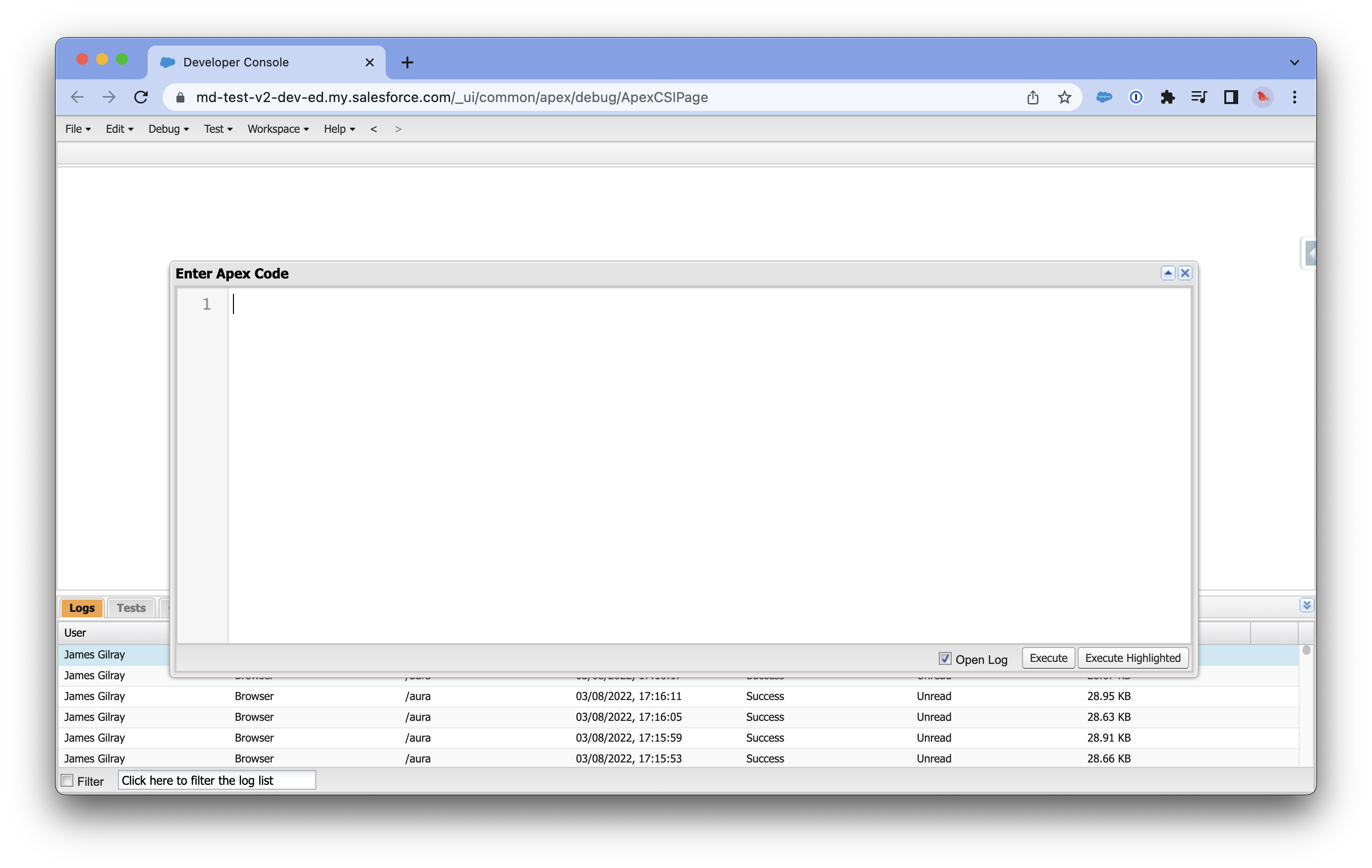
In Salesforce, click the gear icon and select Developer Console. Go to Debug > Open Execute Anonymous Window.
3. Run the migration script#
Paste the following Apex script into the Execute Anonymous window:
List<md_npsp_pack__Contact_Platform_Key__c> lstContact = new List<md_npsp_pack__Contact_Platform_Key__c>();
List<md_npsp_pack__Account_Platform_Key__c> lstAccount = new List<md_npsp_pack__Account_Platform_Key__c>();
List<md_npsp_pack__Platform_Key__c> lst = [SELECT Id, Name, md_npsp_pack__Platform__c, md_npsp_pack__Platform_Key__c, md_npsp_pack__Contact__c, md_npsp_pack__Account__c FROM md_npsp_pack__Platform_Key__c LIMIT 2000];
System.Debug('List Size: ' + lst.size());
for (md_npsp_pack__Platform_Key__c item : lst) {
    if (item.md_npsp_pack__Contact__c != null) {
        md_npsp_pack__Contact_Platform_Key__c record = new md_npsp_pack__Contact_Platform_Key__c();
        record.md_npsp_pack__Platform__c = item.md_npsp_pack__Platform__c;
        record.md_npsp_pack__Platform_Key__c = item.md_npsp_pack__Platform_Key__c;
        record.md_npsp_pack__Contact__c = item.md_npsp_pack__Contact__c;
        lstContact.add(record);
    }
    if (item.md_npsp_pack__Account__c != null) {
        md_npsp_pack__Account_Platform_Key__c record = new md_npsp_pack__Account_Platform_Key__c();
        record.md_npsp_pack__Platform__c = item.md_npsp_pack__Platform__c;
        record.md_npsp_pack__Platform_Key__c = item.md_npsp_pack__Platform_Key__c;
        record.md_npsp_pack__Account__c = item.md_npsp_pack__Account__c;
        lstAccount.add(record);
    }
}
System.Debug('Contact List Size: ' + lstContact.size());
System.Debug('Account List Size: ' + lstAccount.size());
if (lstContact.size() > 0) insert lstContact;
if (lstAccount.size() > 0) insert lstAccount;
delete lst;
Click Execute.
4. Check the results#
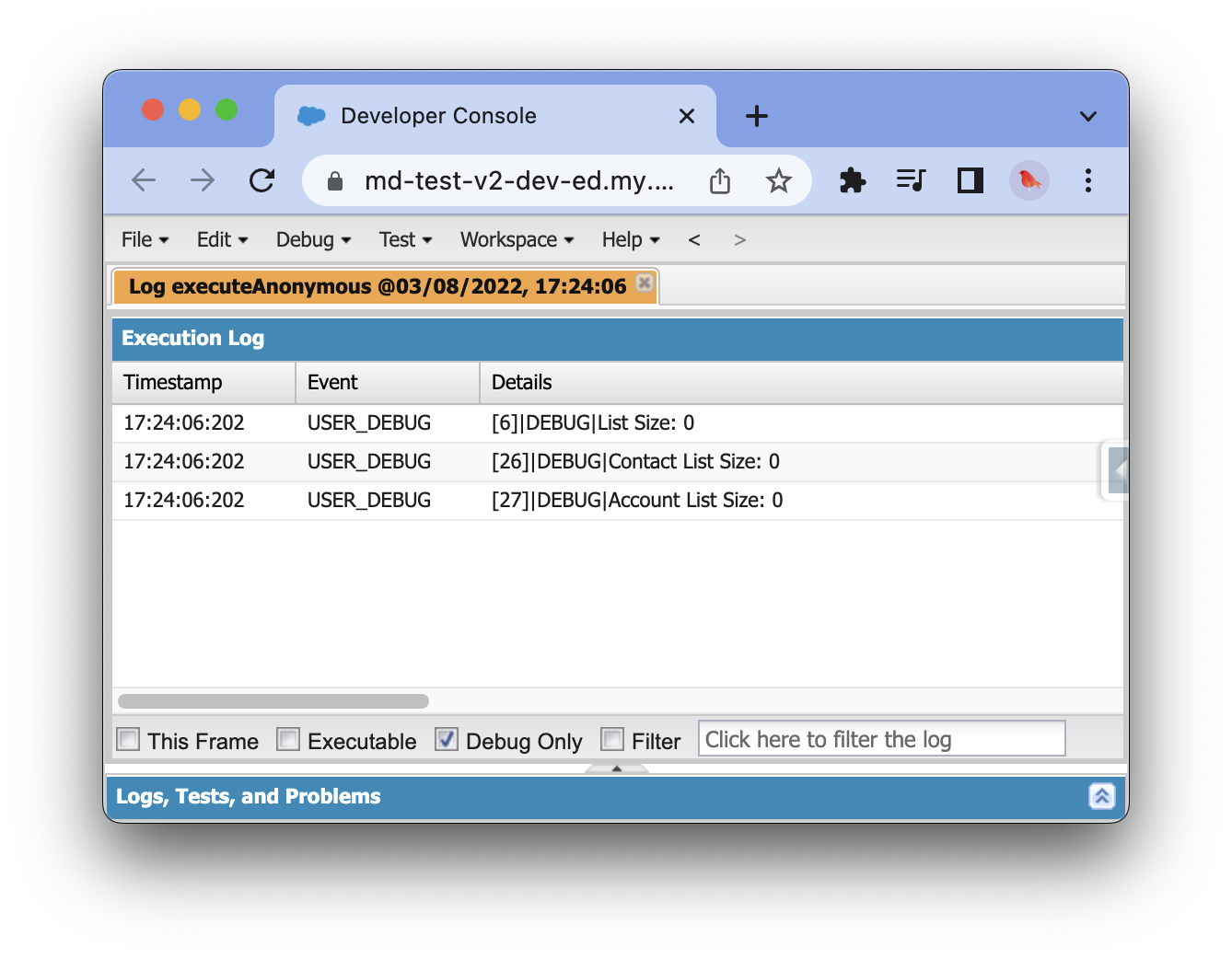
After execution, click the Debug Only toggle in the log output.
Look for the List Size line.
- If
List Size: 0— the migration is complete. All records have been processed. - If
List Sizeis greater than 0 — records remain. Continue to the next step.
5. Rerun until complete#
The script processes 2,000 records at a time.
If your List Size was greater than 0, run the script again.
Repeat until the debug output shows List Size: 0.
Troubleshooting the migration#
DmlException — duplicate value found#
You may see this error during migration:
System.DmlException: Insert failed. First exception on row 440; first error: DUPLICATE_VALUE, duplicate value found...
This means a platform key record already exists in the new structure — typically from a partial previous migration run.
To resolve:
- Note the record ID from the error message.
- Open the record in Salesforce by pasting the ID into the URL:
https://yourdomain.lightning.force.com/lightning/r/md_npsp_pack__Contact_Platform_Key__c/RECORD_ID/view - Note the Platform Key value on the record.
- Open Developer Console and go to the Query Editor tab.
- Query for duplicates using the platform key value:
SELECT Id, md_npsp_pack__Platform_Key__c, md_npsp_pack__Contact__c FROM md_npsp_pack__Contact_Platform_Key__c WHERE md_npsp_pack__Platform_Key__c = 'YOUR_KEY_VALUE' - Delete the duplicate record.
- Rerun the migration script.
Note
When a duplicate error occurs, the entire batch rolls back. No records from that execution are migrated. Fix the duplicate and rerun the script to process the full batch.
Check both Contact and Account platform keys
The duplicate may exist on either Contact_Platform_Key__c or Account_Platform_Key__c.
Run the query against both objects if you cannot find it on the first.
After migration#
Once the migration script returns List Size: 0:
- Resume normal MoveData notification processing.
- Monitor the first few notifications to confirm they process with Success status.
- Verify that contacts and accounts match correctly — no new duplicates should appear.