Setting up PayPal Giving Fund
This guide walks you through connecting PayPal Giving Fund to MoveData. This integration processes CSV payout files and imports donation data into Salesforce.
| Field | Detail |
|---|---|
| Product | PayPal Giving Fund |
| Method | CSV file processing |
| Frequency | Manual upload |
Supported extensions#
This integration requires the Fundraising and Donations extension.
Supported file types#
MoveData supports the payout report from PayPal Giving Fund. This is not the same as the transaction report — you must use the payout file format. This is the only file type supported for this integration.
Example payout report#
The table below describes the columns you will find in each row. You can download an example file to use as a test upload.
| Column | Description | Example |
|---|---|---|
| Payout Date | Date PayPal settled the funds | 2025-04-29 |
| Donation Date | Date the donation was made | 2025-03-17 |
| Donor First Name | Donor first name (or "Anonymous") | Sarah |
| Donor Last Name | Donor last name (blank for anonymous) | Williams |
| Donor Email | Donor email (blank for anonymous) | sarah.williams@example.com |
| Program Name | Source programme identifier | eBay for Charity Seller Donations |
| Reference Information | Fundraiser or transaction context | eBay Seller Donation |
| Currency Code | Three-letter currency code | GBP |
| Gross Amount | Original donation amount | 61.00 |
| Total Fees | Fees deducted by PayPal | 0.34 |
| Net Amount | Amount after fees | 10.00 |
| Transaction ID | Unique PayPal transaction identifier | 7PJ62026ST924680A |
| Supplemental Transaction ID | Secondary transaction reference | 7DH62819SB3063259 |
Handling your CSV file#
Always upload the original file exactly as downloaded from PayPal Giving Fund. Do not open or resave it in Microsoft Excel, Google Sheets, or Numbers. These applications silently reformat dates, strip leading zeros, and alter CSV encoding in ways that cause import failures.
If you need to inspect or edit specific values (for example, to adjust a currency code), use a plain text editor such as Sublime Text, Notepad++, or VS Code. Do not alter column headers, delimiters, or file encoding. Any modifications to the file are at your own risk.
Date formatting errors are the most common cause of failed imports. If MoveData reports date errors after upload, the file has almost certainly been opened in a spreadsheet application. Re-export the original payout file from PayPal Giving Fund and upload it again.
Salesforce records created#
MoveData creates different Salesforce records depending on your data model.
| PayPal Giving Fund data | Nonprofit Success Pack (NPSP) | Nonprofit Cloud |
|---|---|---|
| Donor | Contact | Person Account |
| Programme | Campaign (with hierarchy) | Campaign (with hierarchy) |
| Donation | Opportunity | Gift Transaction |
A significant proportion of PayPal Giving Fund donations are anonymous. When a donation is anonymous, MoveData assigns it to the anonymous contact defined in your organisation's MoveData settings.
Before you begin#
You need access to the MoveData app in Salesforce. You also need a payout report exported from PayPal Giving Fund in CSV format.
Setting up the integration#
Step 1: Export your payout report#
- Log in to your PayPal Giving Fund charity dashboard.
- Navigate to Reports or Payouts.
- Generate and download your payout report as a CSV file.
- Confirm you are downloading the payout file format, not a transaction report.
Step 2: Open the Integrations tab#
In the MoveData app in Salesforce, click the Integrations tab in the navigation bar.
Step 3: Create a new integration#
Click New Integration and select PayPal Giving Fund from the list of available platforms.
Step 4: Name your integration#
Enter a descriptive name for this integration (for example, "PayPal Giving Fund - All Sources") and click Save.
Step 5: Configure your integration settings#
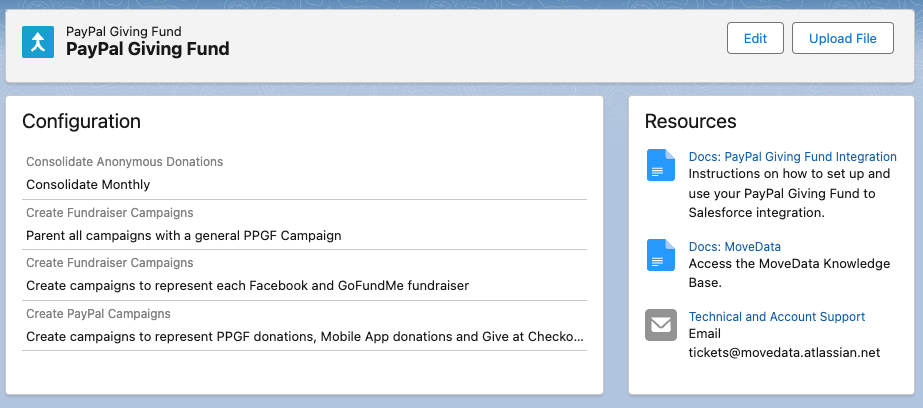
Configure the four available options to control how MoveData processes your data. See Configurable options below for detailed guidance on each setting.
Step 6: Upload your CSV file#
Click the Upload File button and select the payout CSV file you exported in Step 1. MoveData begins processing the file automatically.
After uploading, check the Notifications tab or Executions tab in MoveData to monitor processing status.
Configurable options#
PayPal Giving Fund has four configurable options that control campaign structure and anonymous donation handling.
Consolidate Anonymous Donations#
This setting controls how MoveData handles donations where the donor's identity is not shared.
| Setting | Behaviour |
|---|---|
| Consolidate Monthly | Aggregates anonymous donations by campaign at monthly level. Uses the Payout Date as the donation date. Best for high-volume sources where individual anonymous records would overwhelm Salesforce storage. |
| Consolidate Daily | Aggregates anonymous donations by campaign at daily level. Uses the Donation Date as the donation date. Provides more granular reporting than monthly consolidation. |
| Do not consolidate | Creates a separate notification for each anonymous donation row. Uses the Donation Date as the donation date. Only recommended for low-volume sources. |
When consolidation is enabled, MoveData combines anonymous donations by programme and reference information into a single record for the consolidation period. When disabled, each anonymous donation creates a separate Opportunity or Gift Transaction using the original Transaction ID as the unique key.
Create Fundraiser Campaigns#
When enabled, MoveData creates child campaigns for each individual Facebook fundraiser and GoFundMe campaign. When disabled, donations are aggregated under the programme-level campaign (for example, "Facebook donations") without individual fundraiser detail.
Create PayPal Campaigns#
When enabled, MoveData creates separate child campaigns for each PayPal programme type (Donations with PPGF, Give at Checkout, App and Web Donations, Special Campaigns, Generosity Network). When disabled, all PayPal-source donations are combined into a single PayPal campaign.
Parent with General Campaign#
When enabled, MoveData creates a top-level campaign called PayPal Giving Fund that parents all programme-level campaigns. This is useful if you want to report on all PPGF donations as a single group.
How campaigns are organised#
MoveData creates a campaign hierarchy from your PayPal Giving Fund data. The structure depends on which configurable options you enable.
With all options enabled#
PayPal Giving Fund (top-level)
├── Facebook donations (programme)
│   ├── Richard's Birthday Fundraiser (individual fundraiser)
│   └── Sarah's Marathon Challenge (individual fundraiser)
├── GoFundMe Certified Charity Campaigns (programme)
│   └── Emergency Relief Appeal (individual fundraiser)
├── PayPal Donations (programme)
├── PayPal Give at Checkout (programme)
├── PayPal App and Web Donations (programme)
└── Humble Bundle (programme)
Migrating historical data#
You can import historical donation data through the same file upload process. Export your past reports from PayPal Giving Fund and upload each file using the Upload File button.
Troubleshooting#
Wrong file format
If your upload produces unexpected results or errors, confirm you are using the payout file format rather than a transaction report. The payout file contains different columns and structure to the transaction report.
Excessive Salesforce records
If you notice a large number of anonymous donation records in Salesforce, review your Consolidate Anonymous Donations setting. Switching to monthly or daily consolidation reduces record volume significantly.
Other resources#
- MoveData PayPal Giving Fund Integration — overview of supported features and Salesforce record mapping
- PayPal Giving Fund — PayPal's charitable giving platform
- Access Your Charity Dashboard — how to access and navigate the PPGF charity dashboard
- Track Your PPGF Donations — how to view and download donation activity
- How PPGF Grants Donations — how PayPal Giving Fund distributes donations to charities
- MoveData Support — for setup assistance and technical support