Campaign member status errors
When MoveData processes donations, it creates campaign members with specific statuses like Donor or Team Leader. If another process or a manual change conflicts with these statuses, Salesforce throws a sort order error.
Error message#
You may see this error in your execution log:
A Campaign Member status already a specified sort order. Please specify a different sort order to create this Campaign Member status.
For help finding this error, see Reading and understanding error messages.
How MoveData uses campaign member statuses#
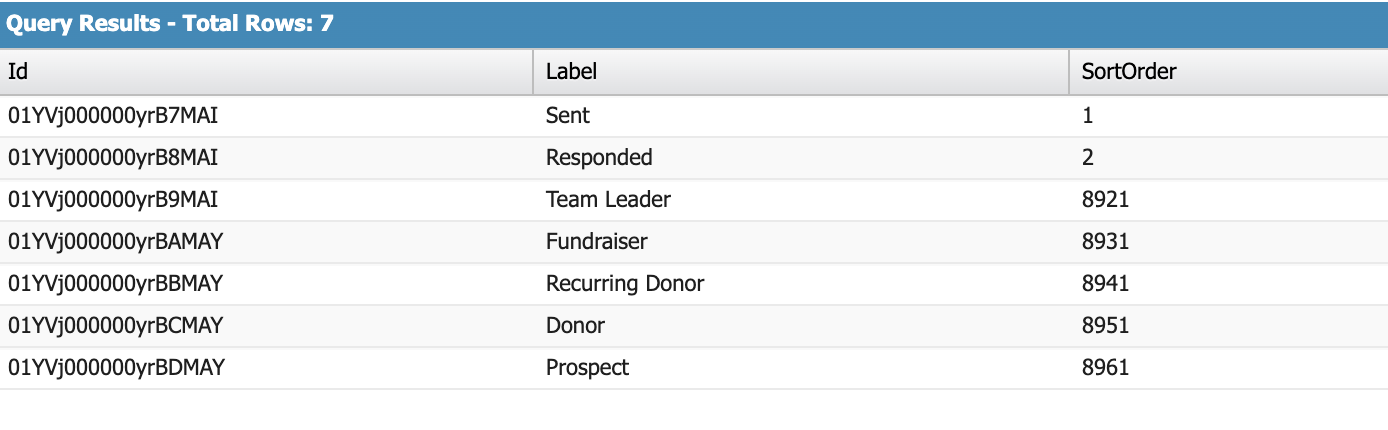
MoveData's NPSP extensions add five campaign member statuses to each campaign. A campaign member status defines the role a contact plays in a campaign (for example, Donor or Fundraiser).
Each status has a sort order — a number that controls the display order in Salesforce. MoveData uses high sort order values (8921–8961) to avoid conflicts with standard Salesforce statuses.
What causes this error#
This error has two common causes.
Cause 1: A MoveData-governed status was renamed#
MoveData looks up campaign member statuses by name. If you rename a status that MoveData manages, MoveData tries to recreate it with the original name.
For example, if you rename "Recurring Donor" to "Monthly Donor":
- MoveData processes a recurring donation.
- It looks for a status called "Recurring Donor" and does not find one.
- It tries to create "Recurring Donor" with sort order 8941.
- Sort order 8941 is already taken by "Monthly Donor".
- Salesforce throws the sort order error.
Cause 2: Another process creates overlapping statuses#
Another tool, automation, or manual action may have created campaign member statuses that use sort orders in the 8921–8961 range. When MoveData tries to add its statuses, the sort orders conflict.
How to fix it#
If a status was renamed#
You have two options:
- Revert the name. Change the renamed status back to its original MoveData name (for example, change "Monthly Donor" back to "Recurring Donor").
- Create a new status with the original name. Add a new campaign member status using the original name and a different sort order that does not conflict.
Warning
MoveData matches campaign member statuses by exact name. Any name change to a MoveData-governed status causes this error.
If another process created overlapping statuses#
- Identify which process created the conflicting statuses.
- Change the sort orders of the conflicting statuses to values outside the 8921–8961 range.
- If you cannot change the other process, you can switch off MoveData's campaign member status creation.
After fixing the issue#
Once you have fixed the conflicting statuses, reprocess the failed notification. For steps, see How to reprocess failed notifications.