Salesforce architecture
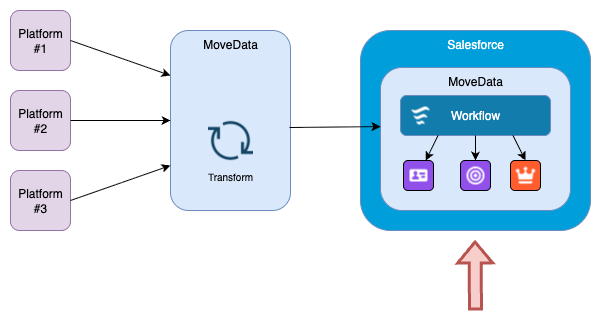
MoveData runs entirely within your Salesforce org as a managed package. It processes fundraising data from external platforms into native Salesforce records. It uses a schema-driven pipeline with extensible business logic built on Salesforce Flows.
This article covers the Salesforce-side components of MoveData's architecture. It is for Salesforce administrators and developers who want to understand how the managed package works and where customisation points exist.
Architecture overview
For a conceptual introduction to MoveData's three-stage lifecycle (ingestion, transformation, execution), see the architecture overview.
Managed package#
MoveData is distributed as a Salesforce managed package through the AppExchange. The package contains all the custom objects, fields, Apex classes, Lightning components, and Flows that MoveData needs to operate.
Key characteristics of the managed package approach:
- Native execution — all record operations run inside your Salesforce org. They use your org's data model, security settings, and automation.
- Transactional integrity — MoveData rolls back all changes within a notification if an error occurs. This prevents partial data from being saved to your org.
- Managed upgrades — updates arrive through the standard Salesforce managed package upgrade process. Your customisations are preserved because they sit outside the managed package namespace.
- Security model — MoveData respects your org's field-level security, object permissions, and sharing rules. All record operations run as the MoveData Authorised User.
For details on permission sets included with MoveData, see Permission sets.
Schema-driven processing#
MoveData uses a standardised schema layer to normalise data from different fundraising platforms before processing it into Salesforce. A schema is a fixed structure that defines how data is organised. Every platform's data is transformed into one of two schemas before it reaches your org.
Donation schema#
The donation schema maps fundraising and donation information to a standardised structure, including:
- One-off donations
- Fundraising pages
- Campaigns and events
- Recurring donations
- Matched gifts
- Tributes and in-memory donations
Commerce schema#
The commerce schema maps ticket and merchandise sale information to a standardised structure, including:
- Merchandise sales
- Ticket sales
- Raffle sales
Why schemas matter#
The schema layer means your Salesforce-side business rules do not need to handle platform-specific data formats. Whether a donation comes from Raisely, JustGiving, or a CSV upload, it arrives at your Salesforce org in the same structure.
This has several practical benefits:
- Consistent data quality — every platform's data goes through the same validation before reaching Salesforce.
- Simpler customisation — you write business rules against one schema, not one per platform.
- Faster setup — adding a new fundraising platform does not require new Salesforce-side configuration.
- Lower maintenance — changes to your business rules apply across all connected platforms.
For full schema reference documentation, see the donation schema and commerce schema.
Processing pipeline#
MoveData processes each notification through a pipeline of ordered phases inside Salesforce. A pipeline is a sequence of steps that run in a fixed order. Each phase handles a specific record type (Account, Contact, Campaign, Donation, and so on) and follows the same pattern:
- Check for an existing record using the platform unique identifier.
- If no match is found, run Salesforce duplicate rules to check for matches.
- Create or update the record.
- Execute any custom business logic attached to that phase.
The pipeline processes all phases within a single Salesforce transaction. If any phase fails, MoveData rolls back the entire notification to maintain data integrity.
Single transaction processing
Because the entire pipeline runs in a single Salesforce transaction, all governor limits (DML operations, SOQL queries, CPU time) apply across all phases combined. See Performance and scalability for how MoveData manages this.
For details on pipeline phases and configuration, see the pipeline overview.
Extension architecture#
Extensions are separate managed packages that contain the logic for mapping notification data onto Salesforce records. Each extension targets a specific Salesforce data model.
MoveData provides three extensions:
| Extension | Description | Supported data model |
|---|---|---|
| NPSP Fundraising & Donations | Maps donation and fundraising information to the NPSP data model. | NPSP |
| NPSP Commerce | Maps ticket and merchandise sales to the NPSP data model. | NPSP |
| Nonprofit Cloud | Maps all supported information to the Nonprofit Cloud data model. | Nonprofit Cloud |
Each extension contains pre-built Salesforce Flows that define how notification data maps onto Salesforce records. Because the logic lives in Flows, you can inspect it directly in Salesforce's Flow Builder.
You install only the extension that matches your Salesforce data model. For details on choosing and configuring extensions, see Understanding extensions.
Customisation framework#
MoveData exposes its business logic as Salesforce Flows. This means you can customise processing behaviour using Salesforce's declarative tools without modifying the managed package.
Customisation levels#
MoveData supports three levels of customisation:
| Level | How it works | Audience |
|---|---|---|
| Configuration settings | Toggle-based options in MoveData settings that control default behaviours such as duplicate matching, field protection, and campaign handling. | All users |
| Flow-based rules | Custom Salesforce Flows that you attach to pipeline phases to implement business logic. These run at specific points during notification processing and can read, modify, or cancel processing. | Admins |
| Apex extensibility | Custom Apex code that integrates with MoveData's processing framework for advanced requirements. | Developers |
Pre-built flow templates#
MoveData extensions include pre-built Flows for common processing patterns. These serve as both working implementations and templates that you can clone and modify for your own requirements.
Common customisations include:
- Setting record types based on donation source or amount.
- Routing donations to specific campaigns based on custom logic.
- Mapping platform-specific custom fields onto Salesforce records.
- Skipping or cancelling processing for certain transaction types.
- Inheriting values between related records (for example, copying campaign data onto an opportunity).
Error handling and recovery#
MoveData provides several mechanisms for handling errors during Salesforce-side processing:
- Transactional rollback — if any phase in the pipeline fails, MoveData rolls back all database changes for that notification. No partial records are created.
- Execution logs — every pipeline phase records detailed logs, including the data values used at each step. You can inspect these from the notification detail page in the MoveData Lightning application.
- Automatic retry — MoveData automatically retries notifications that fail due to transient issues such as record lock contention.
- Reprocess — you can manually reprocess failed notifications after resolving the underlying issue. The reprocess button is available on the notification detail page.
- Error notifications — MoveData sends email alerts to designated users when notifications fail, so your team can respond promptly.
Diagnosing errors
For guidance on interpreting error messages and resolving common failures, see Reading and understanding error messages.
Performance and scalability#
MoveData uses several techniques to manage Salesforce governor limits and process data efficiently:
- Batch processing — notifications are grouped and processed in batches to optimise DML operations and SOQL query usage within Salesforce's per-transaction limits.
- Intelligent caching — MoveData caches frequently accessed data (such as campaign records and duplicate rule results) within a transaction to reduce redundant queries.
Security model#
MoveData operates within Salesforce's existing security framework. It does not bypass or override your org's security settings.
Record access#
All record operations run in the context of the MoveData Authorised User. The Authorised User's profile, permission sets, and sharing rules determine what MoveData can read and write.
Authorised User permissions
The MoveData Authorised User must have sufficient permissions to create and update all records that MoveData processes. If the Authorised User lacks access to a required object or field, notifications will fail during processing.
Data protection#
- All communication between MoveData's cloud platform and Salesforce uses OAuth 2.0 authentication and encrypted HTTPS connections.
- MoveData does not store donor or transaction data at rest on its cloud infrastructure beyond the time needed for processing.
- MoveData supports organisations subject to GDPR, CCPA, and other data protection regulations.
For full details, see Security overview.
Monitoring#
MoveData includes a Lightning application within Salesforce for monitoring integration activity:
- Notifications tab — lists all notifications with their current status (Success, Failed, Skipped, or Processing). You can filter by platform, status, and date range.
- Execution logs — detailed per-notification logs showing every pipeline phase, the data values used, and any errors encountered.
- Error reporting — failed notifications are flagged with error details and can be reprocessed directly from the notification detail page.
Related articles#
- Architecture overview — conceptual introduction to MoveData's three-stage lifecycle
- Platform architecture — cloud infrastructure and AWS components
- Pipeline overview — how notification processing pipelines work
- Understanding extensions — choosing and configuring extensions
- Permission sets — managed package permission sets
- MoveData settings — configuration options
Other resources#
- MoveData website — product information and platform overview
- Salesforce AppExchange listing — managed package details and reviews