Uninstalling MoveData
This guide explains how to remove MoveData and its extension packages from your Salesforce organisation. The process requires removing dependencies in a specific order, starting with customisations and extensions before uninstalling the core MoveData package.
Uninstall in the correct order
You must remove all dependent customisations and extension packages before you can uninstall the core MoveData package. Salesforce blocks the uninstall if any dependencies remain.
Before you begin#
- You need Salesforce system administrator permissions to uninstall managed packages.
- Confirm that your organisation no longer needs MoveData before proceeding. Uninstalling permanently removes all associated components, custom fields, and data from Salesforce.
- If you are unsure which extensions are installed, review Understanding extensions for a full list.
- Email support@movedata.io to conclude your billing arrangement. Uninstalling MoveData does not automatically cancel your subscription or prevent future invoices from being sent.
Save a copy of your data
During the uninstall process, Salesforce offers the option to save a copy of the package's data for 48 hours. Select this option if you may need to reference your MoveData data after uninstalling.
Step 1: Remove custom flows and automations#
Before uninstalling any packages, remove all customisations that depend on MoveData or its extensions.
- Go to Setup > Process Automation > Flows.
- Search for flows prefixed with [MoveData Extension] or any custom flows that reference MoveData components.
- Deactivate each flow, then delete it.
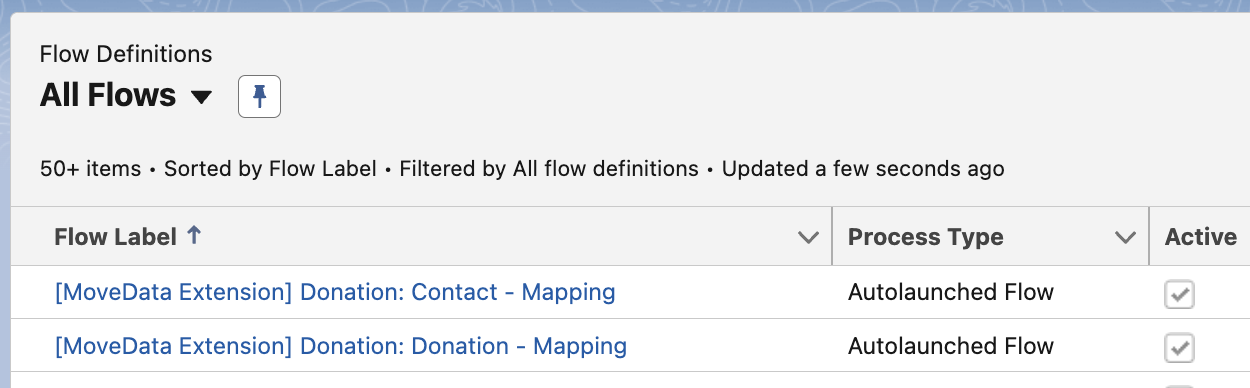
Repeat this step for any other automations, such as Apex triggers or workflow rules, that reference MoveData objects or fields.
Step 2: Uninstall MoveData extension packages#
Once all custom flows and automations are removed, uninstall each MoveData extension package.
MoveData extensions include:
- MoveData NPSP Extensions
- MoveData Commerce Extensions
- MoveData Non-Profit Cloud Extensions
- MoveData Forms Extensions
To uninstall each extension:
- Go to Setup > Apps > Packaging > Installed Packages.
- Find the extension package in the list.
- Click Uninstall next to the package name.
- On the confirmation screen, select Save a copy of this package's data for 48 hours after uninstall.
- Tick the checkbox labelled Yes, I want to uninstall this package and permanently delete all associated components.
- Click Uninstall.
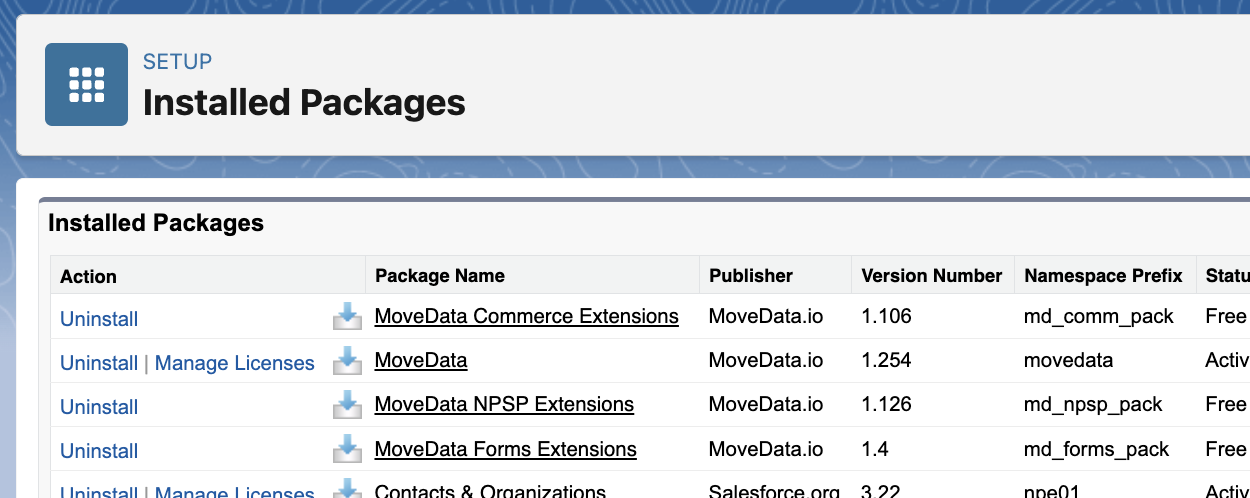
Repeat this process for each extension package installed in your organisation.
Note
You do not need to uninstall extensions in a particular order relative to each other. You only need to ensure all extensions are removed before uninstalling the core MoveData package.
Step 3: Uninstall the core MoveData package#
After all extensions have been removed, uninstall the core MoveData package.
- Go to Setup > Apps > Packaging > Installed Packages.
- Find MoveData in the list.
- Click Uninstall.
- On the confirmation screen, select Save a copy of this package's data for 48 hours after uninstall.
- Tick the checkbox labelled Yes, I want to uninstall this package and permanently delete all associated components.
- Click Uninstall.

If you have not removed all dependencies, Salesforce shows a page listing every dependency that is blocking the uninstall.
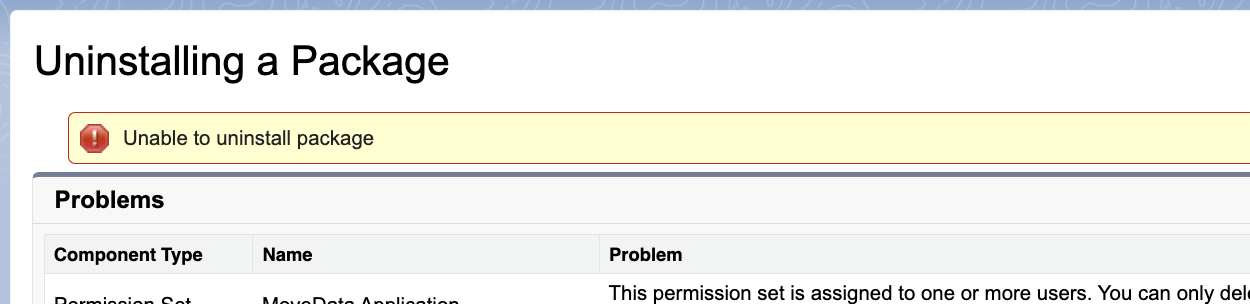
Salesforce processes the uninstall and sends you a confirmation email once it is complete.
Troubleshooting#
Salesforce displays a list of dependencies that must be removed
If you have not removed all dependent components, Salesforce shows a page listing every dependency that is blocking the uninstall. Review the list, remove or delete each item, and then retry the uninstall. Common blockers include custom flows, Apex classes, validation rules, and page layouts that reference package components.
I cannot find MoveData in Installed Packages
Confirm that you are logged in as a system administrator. Go to Setup > Apps > Packaging > Installed Packages and check whether MoveData appears in the list. If it does not appear, the package may have already been uninstalled or may be installed in a different Salesforce organisation.
I need to reinstall MoveData after uninstalling
If you saved a copy of the package data, Salesforce retains it for 48 hours. However, reinstalling the package does not automatically restore this data. Contact MoveData support for assistance with reinstallation and data recovery.