Too many SOQL queries: 101
The "Too many SOQL queries: 101" error occurs when a Salesforce transaction exceeds the maximum number of database queries allowed. This is a Salesforce governor limit, not a MoveData error.
Danger
This error is almost always caused by other automations in your Salesforce org. Record-triggered flows, Process Builder processes, Apex triggers, and managed packages all share the same query budget within a single transaction.
Error messages#
You may see one of these messages in the execution log:
Too many SOQL queries: 101LIMIT_EXCEEDED: System.LimitException: Too many SOQL queries: 101
For help locating these messages, see Reading and understanding error messages.
Why this happens#
Salesforce limits the number of SOQL queries (database lookups) per transaction:
| Transaction type | SOQL query limit |
|---|---|
| Synchronous (immediate) | 100 queries |
| Asynchronous (background) | 200 queries |
Every automation that runs during a transaction — flows, triggers, managed packages — shares this budget. When the combined total exceeds 100 (or 200 for async), Salesforce terminates the transaction.
MoveData's query footprint#
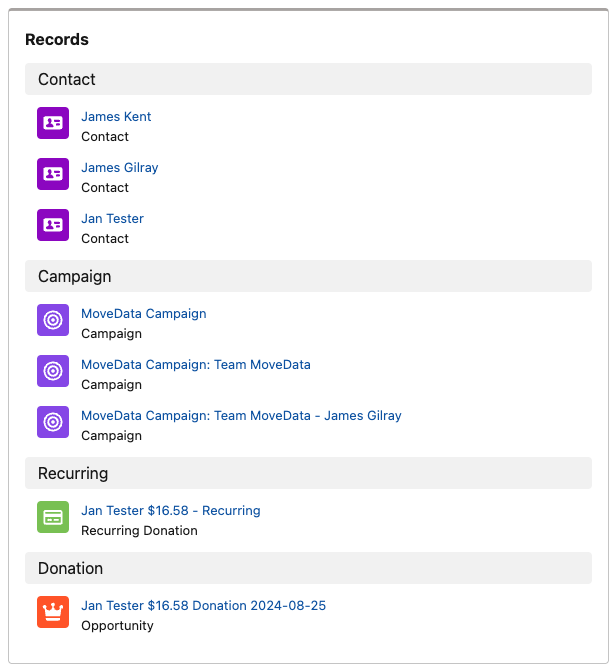
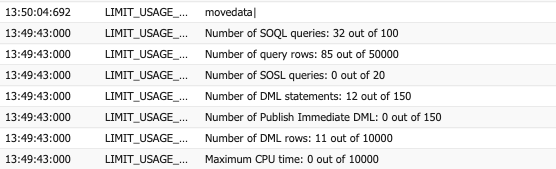
MoveData's processing is efficient. As a benchmark, the NPSP extension processing a complex transaction (3 contacts, 3 campaigns, a recurring donation with a child donation) uses:
- 32 SOQL queries out of the 100-query limit.
- 12 DML statements (record creates/updates) out of the 150-statement limit.
This leaves room for other automations, but if your org has many record-triggered flows or Apex triggers, the combined total can exceed the limit.
Other related limits#
| Limit | Threshold |
|---|---|
| Total query rows returned | 50,000 |
| DML statements | 150 |
| DML rows | 10,000 |
Exceeding any of these limits produces a similar governor limit error.
Common causes#
Record-triggered flows#
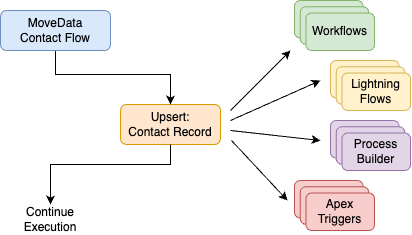
Each record-triggered flow that fires on the same object consumes queries. If you have multiple flows on Contact, Account, or Opportunity, they add up quickly.
Recommendations:
- Add entry conditions so flows only run when relevant fields change.
- Use Fast Field Updates (before-save) where possible — these use fewer queries than after-save flows.
- Enable Run Asynchronously for flows that do not need immediate results.
- Consolidate multiple flows on the same object into a single flow where practical.
Process Builder (legacy)#
Process Builder processes are less efficient than record-triggered flows. Each Process Builder evaluation consumes queries, and they cannot be configured to run asynchronously.
Recommendation: Migrate all Process Builder processes to record-triggered flows.
Workflow rules (legacy)#
Workflow rules with formula criteria consume CPU and queries during evaluation.
Recommendation: Migrate all workflow rules to record-triggered flows.
Apex triggers#
Custom Apex triggers may run inefficient queries (such as queries inside loops).
Recommendation: Review custom triggers with a Salesforce developer. Ensure all queries are bulkified (handle multiple records in a single query).
Managed packages#
Managed packages such as DLRS (Declarative Lookup Rollup Summaries) can consume a large number of queries. See Too many SOQL queries: 101 (DLRS) for specific guidance on DLRS.
How to diagnose#
Step 1: Enable debug logging#
- In Salesforce, go to Setup.
- Type "Debug Logs" in the Quick Find box and select Debug Logs.
- Add a trace flag for your MoveData Authorised User.
- Reprocess the failed notification.
- Open the resulting debug log.

Step 2: Identify query consumers#
Search the debug log for these entries:
| Log entry | What it shows |
|---|---|
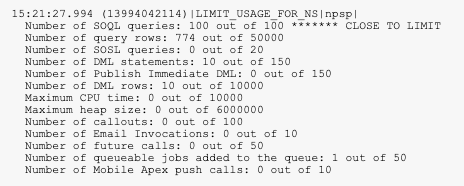
LIMIT_USAGE_FOR_NS |
Query count broken down by namespace (package). Shows which package used the most queries. |
FLOW_CREATE_INTERVIEW |
Each flow that ran during the transaction. Count these to see how many flows fired. |
CODE_UNIT |
Each Apex trigger or class that executed. |
WF_ entries |
Legacy workflow rule evaluations. |
CUMULATIVE_LIMIT_USAGE |
Total SOQL queries used at the end of the transaction. |
Reading namespace query counts
The LIMIT_USAGE_FOR_NS entry shows query usage per namespace.
For example:
movedata— queries used by MoveData.npsp— queries used by the Nonprofit Success Pack.dlrs— queries used by DLRS.default— queries used by your org's custom automations (flows, triggers, workflow rules).
Add these up to see where the 100-query budget is being spent.
Step 3: Count flows per object#
List all record-triggered flows on the objects MoveData creates or updates:
- Contact
- Account
- Opportunity
- Campaign
- Campaign Member
- Any custom objects referenced in your flows
If you have more than two or three flows on any single object, consolidation will help.
How to fix it#
Option 1: Reduce automation overhead#
- Retire legacy automations — migrate Workflow Rules and Process Builder processes to record-triggered flows.
- Consolidate flows — combine multiple flows on the same object and trigger event into one flow.
- Add entry conditions — ensure flows only run when the relevant fields change.
- Use Fast Field Updates — configure before-save flows where possible to reduce query usage.
- Enable Run Asynchronously — for flows that do not need immediate results, run them in a separate transaction.
Option 2: Optimise managed packages#
If a managed package consumes a large share of the query budget, review its configuration. See Too many SOQL queries: 101 (DLRS) for DLRS-specific guidance.
Option 3: Run MoveData post-processing asynchronously#
MoveData can run its post-upsert jobs (Campaign Post and Donation Post flows) asynchronously. This moves part of the processing into a separate transaction with its own 200-query limit. See Run post-processing asynchronously for configuration steps.
Warning
Running post-processing asynchronously changes the timing of your data updates. Records created by MoveData will be saved first, and post-processing will happen shortly after in a separate transaction. Additionally, if an asynchronous MoveData flow fails, the failure will not be captured or reported in the MoveData app because it is running outside the main transaction. For this reason, we recommend trying Options 1 and 2 before enabling asynchronous post-processing.
Resolving this issue#
This error is caused by the cumulative query consumption of all automations in your Salesforce org — not by MoveData specifically. The flows, triggers, Process Builder processes, and workflow rules that contribute to the query limit are typically configured by your organisation or your Salesforce implementation partner.
MoveData support cannot diagnose or fix non-MoveData automations in your Salesforce environment. If you need help identifying and optimising these automations, we recommend engaging your Salesforce partner. If you do not have a Salesforce partner, contact support@movedata.io and we can make an introduction.
After fixing the issue#
- Reprocess the failed notification using the Reprocess button on the notification detail page.
- Check that the notification status changes to Success.
For full reprocessing instructions, see How to reprocess failed notifications.