Setting up Enthuse
This guide walks you through connecting your Enthuse fundraising platform to MoveData. Once connected, donation, campaign, supporter, and gift aid data flows into Salesforce automatically.
| Field | Detail |
|---|---|
| Product | Enthuse |
| Method | Pull (Polling) |
| Frequency | Hourly |
Supported extensions#
This integration requires the Fundraising and Donations extension.
Supported Enthuse products
MoveData supports the Enthuse Donations, Fundraising, and Mass Events products. It does not currently support the Enthuse Events product, which is used to sell tickets.
For more on extensions, see Understanding extensions.
Before you begin#
- You need access to the MoveData app in Salesforce.
- You need API credentials from Enthuse (see below).
- You should have at least one active Enthuse fundraising campaign.
Warning
Enthuse API credentials are not self-service. You must raise a support ticket with Enthuse at support@enthuse.com requesting API access for your MoveData integration. Allow time for Enthuse to process your request before beginning setup.
Setting up the integration#
Step 1: Request your API credentials from Enthuse#
Contact Enthuse support at support@enthuse.com and request the following credentials:
- Client ID — your OAuth application client identifier
- Client Secret — your OAuth application secret key
- API Key — your Enthuse reporting API access key
Step 2: Open the integrations tab#
In Salesforce, open the MoveData app and click the Integrations tab.
Step 3: Start a new integration#
Click New Integration.
Step 4: Select Enthuse#
Choose Enthuse from the list of available platforms.
Step 5: Name your integration#
Enter a descriptive name for your integration (for example, "Enthuse — Main Account") and click Next.
Step 6: Enter your Enthuse credentials#
Enter the three credentials you received from Enthuse:
- Paste your Client ID into the Client ID field.
- Paste your Client Secret into the Client Secret field.
- Paste your API Key into the API Key field.
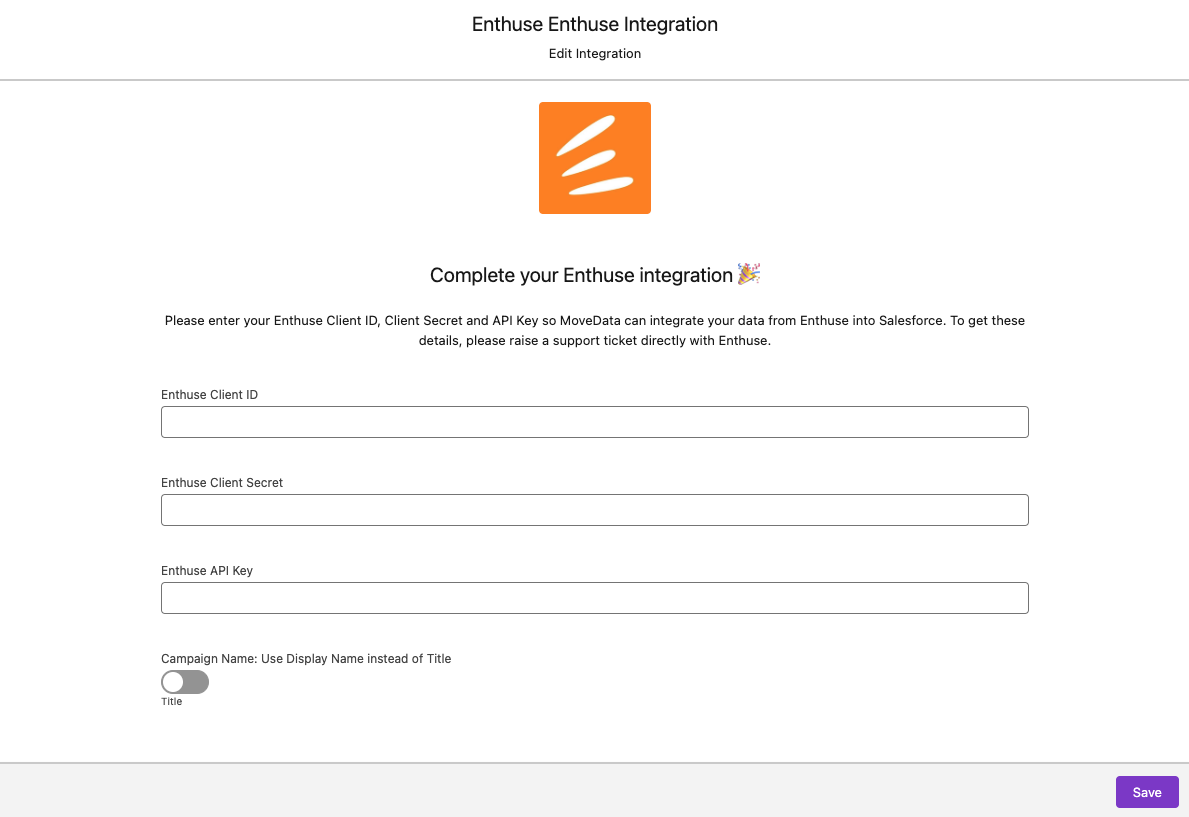
Step 7: Configure integration settings#
Review the integration settings and adjust as needed. See Integration settings below for a full description of each option.
Step 8: Save the integration#
Click Save to finish creating the integration.
After saving, MoveData begins polling Enthuse for data. Check the Notifications tab in MoveData to confirm the integration is processing correctly.
Salesforce records created#
MoveData creates different Salesforce records depending on your data model.
| Enthuse data | Nonprofit Success Pack (NPSP) | Nonprofit Cloud |
|---|---|---|
| Supporter | Contact | Person Account |
| Company | Account | Account |
| Campaign / Page | Campaign (with hierarchy) | Campaign (with hierarchy) |
| Fundraiser role | Campaign Member | Campaign Member |
| Donation | Opportunity | Gift Transaction |
| Subscription | Recurring Donation | Gift Commitment |
Integration settings#
You can adjust these settings on the integration detail page in MoveData. Each option controls how MoveData processes incoming Enthuse data.
| Setting | Options | What it does |
|---|---|---|
| Use Display Name | Enabled Disabled (default) |
Controls campaign naming for fundraising pages. When enabled, uses the supporter's display name as the campaign name. When disabled, uses the page title. |
| Ignore Address2 when United Kingdom | True False (default) |
Enthuse pushes a duplicate of the city name in the Address2 field for UK addresses. Enable this setting to ignore the duplicated value. |
Custom field reference#
Enthuse supports several categories of custom fields. MoveData handles each category differently when mapping data into Salesforce.
Custom codes
Enthuse allows you to define custom codes on fundraising pages.
MoveData maps these using the pattern code{CodeName}.
For example, a custom code called NominalCode with a value of "1234" becomes available as the variable codeNominalCode: 1234.
You can use these variables in your extension flows and field mappings.
System custom fields — Contact
| Field | Description |
|---|---|
enthuseIsFund |
Whether the contact is a fund account |
enthuseIsDonor |
Whether the contact is a donor |
enthuseUserGuid |
Enthuse unique user identifier |
System custom fields — Campaign
| Field | Description |
|---|---|
enthuseOfflineDonationCount |
Number of offline donations recorded against the campaign |
enthuseGiftaidAmount |
Total gift aid amount claimed for the campaign |
System custom fields — Donation
| Field | Description |
|---|---|
enthusePaymentGuid |
Enthuse payment unique identifier |
enthuseCheckoutId |
Enthuse checkout session identifier |
transactionType |
Type of transaction (e.g., online, offline) |
productType |
Product type associated with the donation |
paymentType |
Payment method used (e.g., card, direct debit) |
serviceFee |
Enthuse service fee amount |
giftaidAmount |
Gift aid amount for this donation |
giftaidFee |
Fee charged for gift aid processing |
giftaidHmrcStatus |
HMRC submission status for gift aid |
System custom fields — Recurring donation
| Field | Description |
|---|---|
status |
Original Enthuse subscription status (Active, Failed, Cancelled, Paused) |
Bulk data import#
MoveData only processes data from the time your integration is connected. If you need historical data imported into Salesforce, MoveData offers a professional import service. For details on how this works, pricing, and how to request an import, see Data imports.
Troubleshooting#
Missing or delayed data
Enthuse has an infrequent issue with releasing data in a timely manner, particularly for recurring donations taken via direct debit. When MoveData polls Enthuse, delayed data can be missed if it has not yet been released by the platform.
If you notice missing recurring donation data, check whether the donations have appeared in Enthuse itself. Contact support@movedata.io if you suspect data has been missed.
See Missing Enthuse Data for more detail.
Duplicate city in address fields
Enthuse pushes a duplicate of the city name into the Address2 field for UK addresses. This can cause address data quality issues in Salesforce.
Enable the Ignore Address2 when United Kingdom setting on your integration to resolve this. See Integration settings above.
Other resources#
- MoveData Enthuse Integration — overview of supported features and Salesforce record mapping
- Enthuse — Enthuse's main website for charities
- Enthuse Help Centre — Enthuse support documentation and guides
- Enthuse Salesforce CRM Integration — Enthuse's overview of their Salesforce integration via MoveData
- Enthuse API Documentation — technical API reference for developers
- Case Study: Children with Cancer UK — how Children with Cancer UK automated their Enthuse-to-Salesforce integration