Setting up Grassrootz
This guide walks you through connecting your Grassrootz fundraising platform to MoveData. Once connected, donation, campaign, team, fundraiser, and ticket sale data flows into Salesforce in real time.
| Field | Detail |
|---|---|
| Product | Grassrootz |
| Method | Push (Webhooks) |
| Frequency | Real-time |
Demonstration#
Supported extensions#
This integration requires the Fundraising and Donations extension. The Commerce extension is supported for ticket sales.
Before you begin#
- You need access to the MoveData app in Salesforce.
- You need an account on the Grassrootz platform with permission to manage webhooks.
- You need a Client Key and Client Secret from Grassrootz. These credentials are not available through the Grassrootz admin panel — you must request them by emailing support@grassrootz.com.
Warning
Grassrootz support typically takes a few business days to respond, so request your Client Key and Client Secret before starting the setup process.
Part 1: Create the integration in MoveData#
Step 1: Open the Integrations tab#
In Salesforce, open the MoveData app and click the Integrations tab.
Step 2: Start a new integration#
Click New Integration.
Step 3: Select Grassrootz#
Choose Grassrootz from the list of available platforms.
Step 4: Name your integration#
Enter a descriptive name for your integration (for example, "Grassrootz — Main Events") and click Next.
Step 5: Copy the webhook URL#
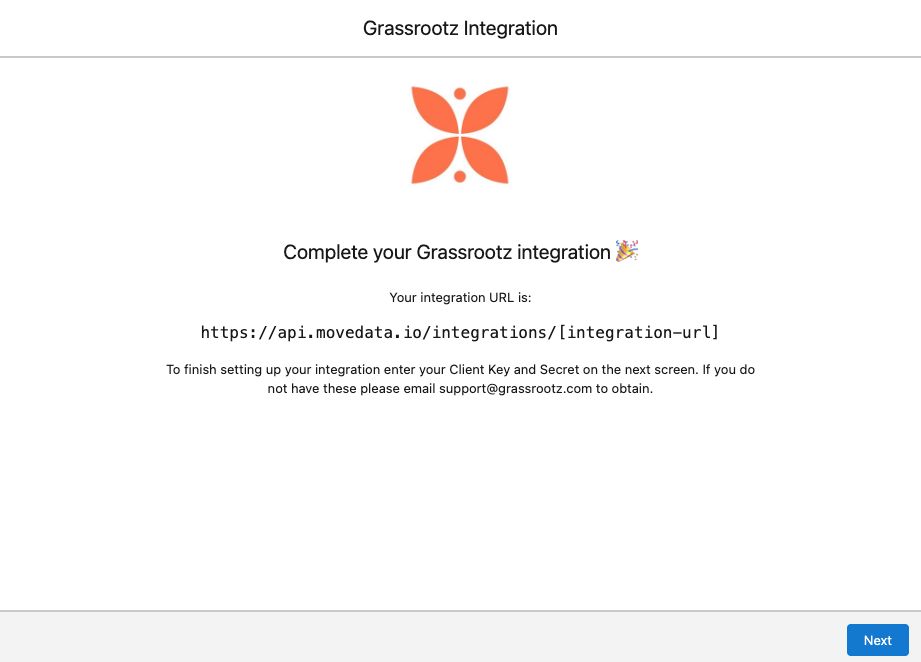
MoveData generates a unique Integration URL for your Grassrootz integration. Copy this URL to your clipboard — you will need it in Part 2.
Part 2: Configure the webhook in Grassrootz#
Step 6: Open webhook settings in Grassrootz#
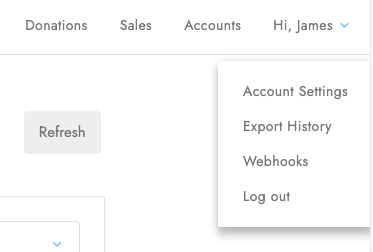
Log in to Grassrootz. Click Hi {Your Name} in the top-right corner, then select Webhooks.
Step 7: Create a new webhook#
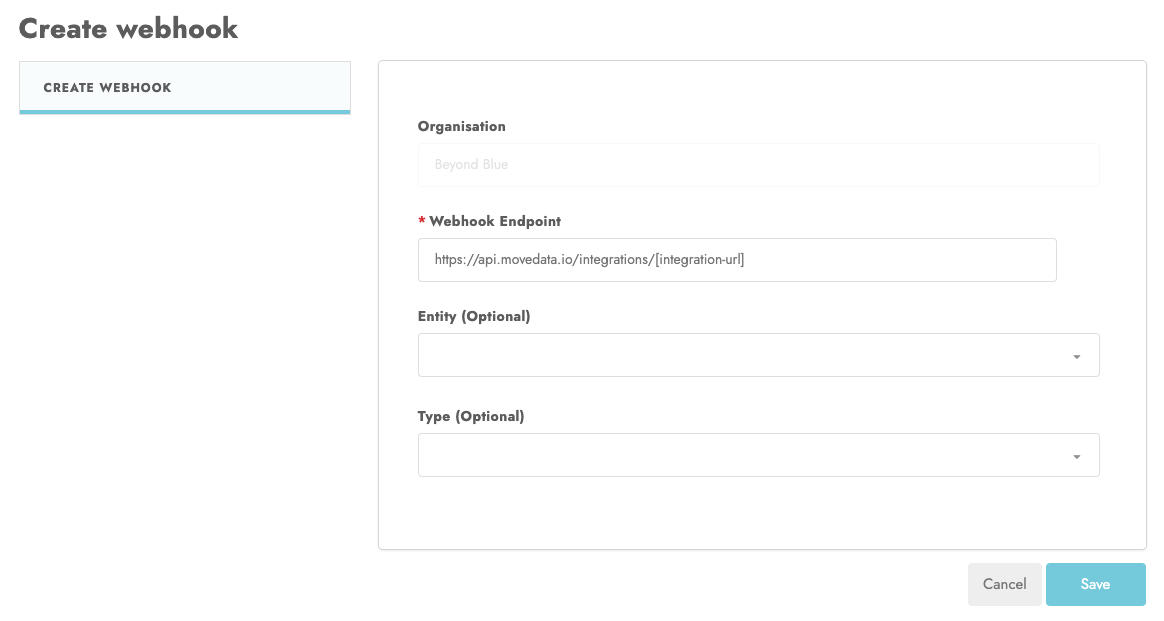
Click Create Webhook. Paste the MoveData integration URL into the Webhook endpoint field. Click Save.
Part 3: Enter your credentials in MoveData#
Step 8: Return to MoveData#
Go back to Salesforce and click Next on the integration setup screen.
Step 9: Enter your Client Key#
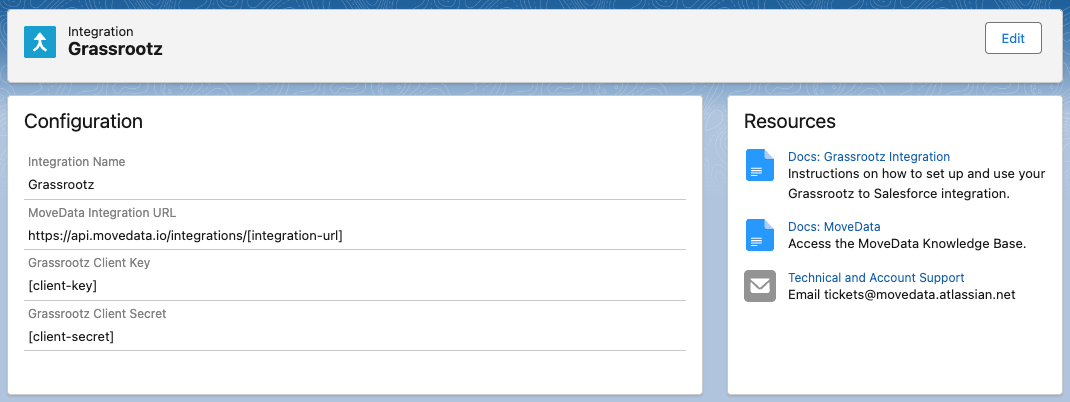
Paste your Grassrootz Client Key into the Client Key field.
Step 10: Enter your Client Secret#
Paste your Grassrootz Client Secret into the Secret Key field.
Step 11: Save the integration#
Click Save to finish creating the integration.
After saving, check the Notifications tab in MoveData to confirm the integration is processing correctly.
Success
Notifications only appear when Grassrootz fires a webhook event. To trigger one manually, open Grassrootz, find a recent donation, click Edit, then click Save without making changes. This pushes a notification through from Grassrootz to MoveData, and you should see it appear in the Notifications list view.
Salesforce records created#
MoveData creates different Salesforce records depending on your data model.
| Grassrootz data | Nonprofit Success Pack (NPSP) | Nonprofit Cloud |
|---|---|---|
| Supporter | Contact | Person Account |
| Organisation | Account | Account |
| Campaign / Event | Campaign (with hierarchy) | Campaign (with hierarchy) |
| Fundraiser role | Campaign Member | Campaign Member |
| Donation | Opportunity | Gift Transaction |
| Recurring donation | Recurring Donation | Gift Commitment |
| Ticket sale | Opportunity (with Opportunity Products) | Opportunity (with Opportunity Products) |
Grassrootz campaigns use a three-level hierarchy: Campaign > Team > Fundraiser. MoveData maps this to a Salesforce campaign hierarchy, with each level becoming a child campaign under a parent.
Integration settings#
You can adjust these settings on the integration detail page in MoveData. Each option controls how MoveData processes incoming Grassrootz data.
| Setting | Options | What it does |
|---|---|---|
| Infer Settlement Currency | Enabled (default) Disabled |
When enabled, MoveData calculates an approximate settled amount using the exchange rate provided by Grassrootz. This is an estimate — not the actual value received from Stripe. See Foreign currency donations for details. |
| Exclude Donor Keys | Disabled (default) Enabled |
When enabled, excludes donor key information from notifications. This prevents overwriting fundraiser details when someone donates on behalf of another person. |
| Disable Ticket Sales | Disabled Enabled |
When Enabled, MoveData skips ticket sale notifications. When Disabled, ticket sales are processed as Opportunities with line items via the commerce pipeline. New integrations default to Disabled; integrations created before ticket sales were supported default to Enabled. Requires the Commerce extension (NPSP) or Nonprofit Cloud extension — see Enabling commerce for the full setup checklist. |
Adding commerce to an existing integration#
MoveData processes Grassrootz ticket sales into Salesforce as Opportunities with line items via the commerce pipeline.
New Grassrootz integrations process ticket sales by default. Integrations created before ticket sales were supported have the Disable Ticket Sales setting set to Enabled to preserve existing behaviour — you need to switch it off to opt in.
If you have an existing Grassrootz integration and want to start processing ticket sales, you need to:
- Install the Commerce extension. NPSP orgs only — Nonprofit Cloud orgs already have commerce included via the Nonprofit Cloud extension.
- Activate the Standard Pricebook in Salesforce.
- Replicate your pipeline metadata entries from
DONATIONtoCOMMERCEso your existing extension flows run for commerce notifications. - Switch the integration setting Disable Ticket Sales to
Disabledon the integration detail page.
See Enabling commerce for the full checklist, including how to replicate Settings → Commerce.
Custom field reference#
Grassrootz provides system custom fields as well as custom form fields that you define on your donation forms and fundraising page forms. MoveData maps all available fields into Salesforce as custom variables that you can use in your extension flows.
Any custom fields you add to your Grassrootz donation forms or fundraising page forms are automatically available as custom variables in MoveData. You can use these in your extension flows and field mappings to store the data in Salesforce.
The following system custom fields are available by default:
System custom fields — Contact
| Field | Description |
|---|---|
isCustomDisplayName |
Whether the supporter uses a custom display name |
displayNameOption |
The display name option selected by the supporter |
displayName |
The supporter's chosen display name |
newsletter |
Newsletter subscription status |
System custom fields — Campaign
| Field | Description |
|---|---|
raisedAmount |
Total amount raised for the campaign |
allowsFundraisers |
Whether the campaign accepts individual fundraisers |
allowsTeams |
Whether the campaign accepts team fundraising |
allowsFitnessActivities |
Whether fitness tracking is enabled |
allowedFitnessActivityTypes |
Types of fitness activities supported |
eventTier |
The tier level of the event |
activePagesCount |
Number of active fundraising pages |
targetAmount |
The campaign's fundraising target |
System custom fields — Team
| Field | Description |
|---|---|
raisedAmount |
Total amount raised by the team |
targetAmount |
The team's fundraising target |
donationCount |
Total number of donations received |
averageDonationAmount |
Average donation amount |
fundraisersCount |
Total number of fundraisers on the team |
fundraisersActiveCount |
Number of active fundraisers on the team |
System custom fields — Fundraiser
| Field | Description |
|---|---|
raisedAmount |
Total amount raised by the fundraiser |
targetAmount |
The fundraiser's target |
donationCount |
Total number of donations received |
averageDonationAmount |
Average donation amount |
isAmbassador |
Whether the fundraiser is an ambassador |
isPublic |
Whether the fundraising page is publicly visible |
System custom fields — Donation
| Field | Description |
|---|---|
receiptNumber |
Grassrootz receipt number |
processor |
Payment processor name |
processorTransactionId |
Payment processor transaction identifier |
cardInformationType |
Card type (for example, Visa, Mastercard) |
cardInformationCountry |
Country of the card issuer |
cardInformationPan |
Masked card number |
settlementDate |
Transaction settlement date |
source |
Donation source |
timezone |
Timezone of the transaction |
cardMethodType |
Payment method type (for example, card, apple_pay) |
Multi-currency fields (when Infer Settlement Currency is enabled)
When Infer Settlement Currency is enabled, MoveData populates additional fields for donations made in foreign currencies:
| Field | Description |
|---|---|
exchangeRate |
Exchange rate used for conversion |
originCurrency |
Original transaction currency |
originAmount |
Amount in the original currency |
originFee |
Fee amount in the original currency |
settledCurrency |
Settlement currency (typically AUD) |
settledAmount |
Amount in the settlement currency |
settledFee |
Fee amount in the settlement currency |
Financial breakdown fields
MoveData captures detailed fee breakdowns from Grassrootz:
| Field | Description |
|---|---|
| Platform fees | Fees charged by Grassrootz |
| Organiser fees | Fees set by the event organiser |
| Silent fees | Silent fees applied to the transaction |
| Taxes | Tax amounts |
| Net amount | Net amount after all fees and taxes |
System custom fields — Organisation
| Field | Description |
|---|---|
organisationName |
Organisation name |
Bulk data import#
MoveData only processes data from the time your integration is connected. If you need historical data imported into Salesforce, MoveData offers a professional import service. For details on how this works, pricing, and how to request an import, see Data imports.
Troubleshooting#
Foreign currency donations
Grassrootz provides the original currency amount and a Stripe-issued exchange rate, but does not provide the actual settled amount. MoveData can approximate the settled value using the Infer Settlement Currency setting, but this may differ slightly from the actual amount received from Stripe.
See Foreign currency donations for full details.
Fee information
Grassrootz captures detailed fee breakdowns including platform fees, organiser fees, silent fees, and taxes.
See Fee information for a full breakdown of how fees are mapped.
Other resources#
- MoveData Grassrootz Integration — overview of supported features and Salesforce record mapping
- Grassrootz — the Grassrootz platform for event fundraising
- Grassrootz Help Centre — Grassrootz support documentation and guides
- Grassrootz Platform Updates — latest platform changes and new features
- Grassrootz Platform Tutorials — video tutorials for platform usage
- Grassrootz Integrations — Grassrootz platform integrations page
- How Cure Cancer Used MoveData — case study using MoveData with Grassrootz
- MoveData Support — for setup assistance and technical support