Setting up Funraisin
This guide walks you through connecting your Funraisin fundraising platform to MoveData. Once connected, donation, event, registration, merchandise, and raffle data flows into Salesforce automatically.
| Field | Detail |
|---|---|
| Product | Funraisin |
| Method | Pull (Polling) |
| Frequency | Every 10 minutes |
Supported extensions#
This integration requires the Fundraising and Donations extension. The Commerce extension is supported for order, sales, raffle, and ticket information.
Before you begin#
- You need access to the MoveData app in Salesforce.
- You need administrator access to your Funraisin Admin site.
- You need your Funraisin Admin URL (your platform URL) and API Key (a 32-character hexadecimal string).
Part 1: Obtain your Funraisin API credentials#
Step 1: Log in to Funraisin Admin Site#
Open your Funraisin Admin site in a browser.
Step 2: Open the API user account#
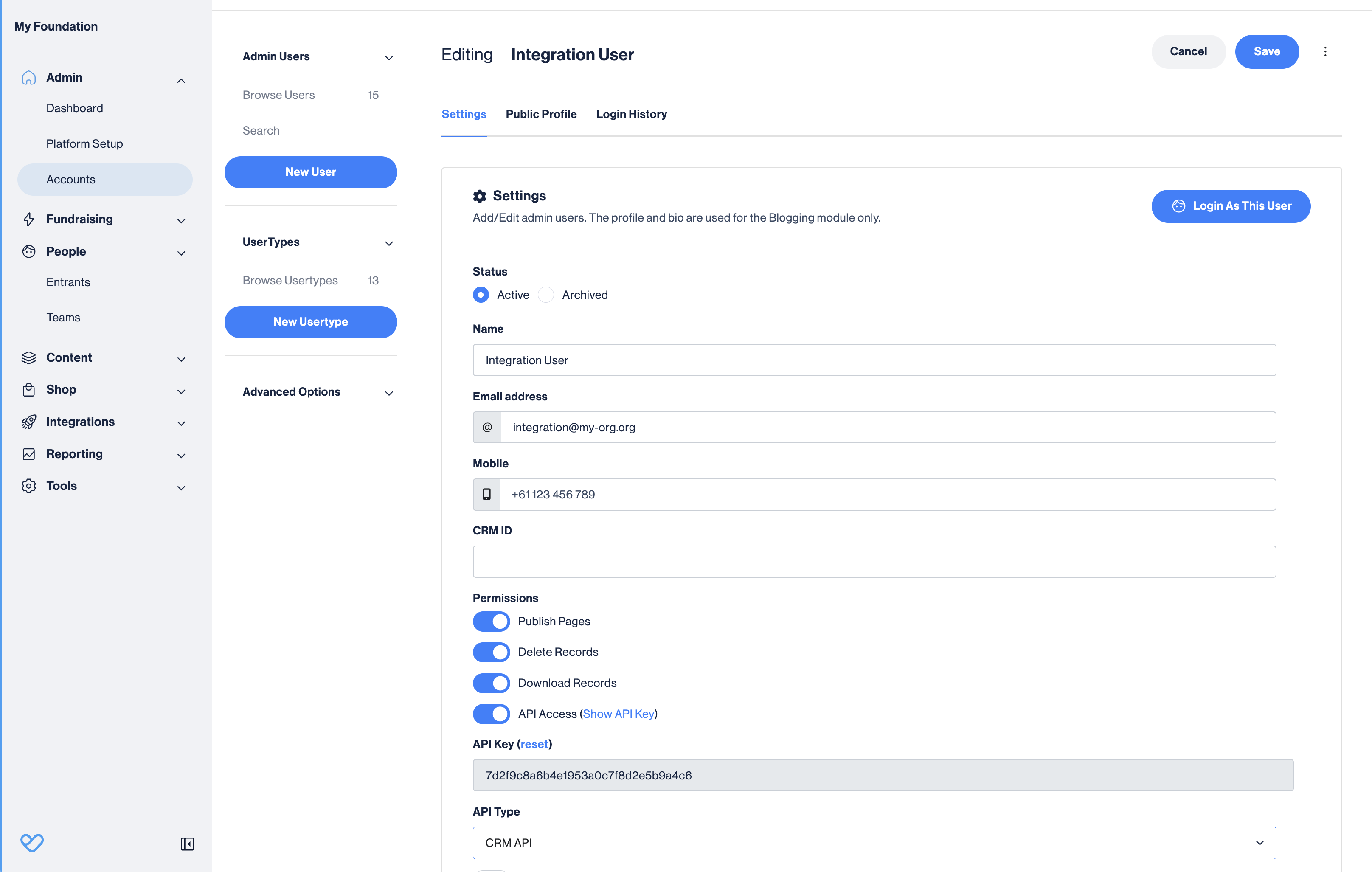
Navigate to Admin > Accounts and open the user account you want to use for the integration.
Step 3: Enable API access#
Ensure API Access is enabled for this user account.
Step 4: Copy your API key#
Locate the 32-character API Key and copy it to your clipboard. Also note your Funraisin Admin URL — this is your API endpoint you will use in Part 2.
Part 2: Create the integration in MoveData#
Step 1: Open the integrations tab#
In Salesforce, open the MoveData app and click the Integrations tab.
Step 2: Start a new integration#
Click New Integration.
Step 3: Select Funraisin#
Choose Funraisin from the list of available platforms.
Step 4: Name your integration#
Enter a descriptive name for your integration and click Next.
Step 5: Enter your API credentials#
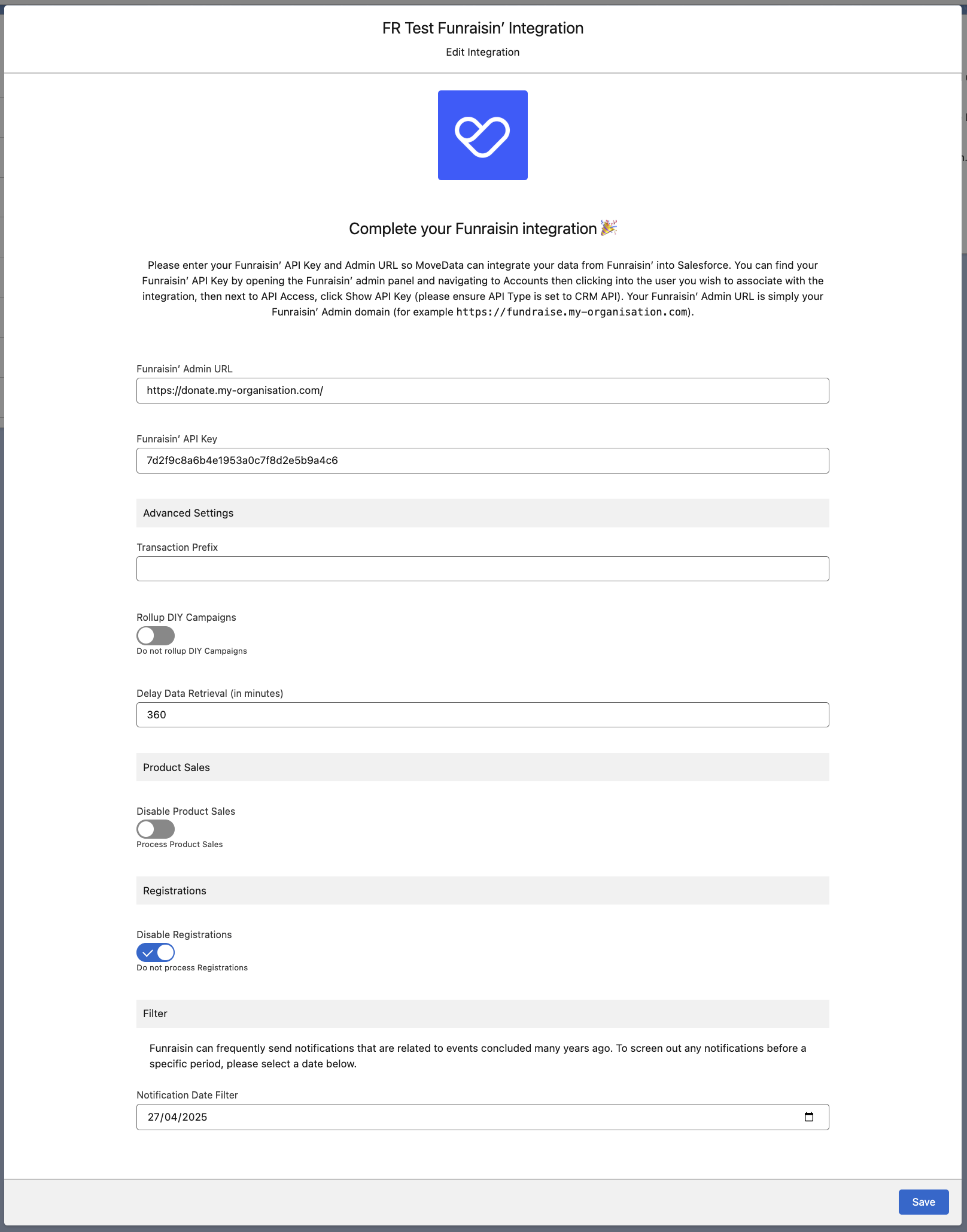
Paste your Funraisin Admin URL and API Key into the corresponding fields.
Step 6: Configure integration options#
Review and adjust the integration settings as needed. See Integration settings below for a full description of each option.
Step 7: Save the integration#
Click Save to finish creating the integration.
After saving, check the Notifications tab in MoveData to confirm the integration is processing correctly.
Salesforce records created#
MoveData creates different Salesforce records depending on your data model.
| Funraisin data | Nonprofit Success Pack (NPSP) | Nonprofit Cloud |
|---|---|---|
| Supporter | Contact | Person Account |
| Company | Account | Account |
| Campaign / Event | Campaign (with hierarchy) | Campaign (with hierarchy) |
| Fundraiser role | Campaign Member | Campaign Member |
| Donation | Opportunity | Gift Transaction |
| Subscription | Recurring Donation | Gift Commitment |
| Order | Opportunity | Opportunity |
Funraisin uses a three-level campaign hierarchy: Campaign, Team, and Individual. MoveData maps this to a Salesforce campaign hierarchy, with each level becoming a child campaign under a parent.
Integration settings#
You can adjust these settings on the integration detail page in MoveData. Each option controls how MoveData processes incoming Funraisin data.
| Setting | Options | What it does |
|---|---|---|
| Transaction Prefix | Text | A prefix added to each platform key. Required when running multiple Funraisin integrations to prevent key collisions. |
| Rollup DIY Campaign | Disabled (default) Enabled |
When enabled, merges DIY events into their parent campaign rather than creating separate campaigns. |
| Data Delay Retrieval | Minutes (default: none) | Adds a time offset before retrieving data to ensure records are complete before processing. |
| Disable Product Sales | Disabled (default) Enabled |
When enabled, skips processing of sales and merchandise transactions. |
| Disable Registrations | Disabled (default) Enabled |
When enabled, skips processing of event registrations and tickets. |
| Date Filter | Date (YYYY-MM-DD) | Excludes records created before the specified date. |
Multiple Funraisin sites
If you connect more than one Funraisin site to MoveData, you must set a unique Transaction Prefix for each integration. Funraisin uses sequential IDs on a site-by-site basis, so without a prefix, IDs can repeat across sites and cause records to overwrite each other.
Adding commerce to an existing integration#
If you have an existing Funraisin integration processing donations only and want to start processing Funraisin sales, raffles, event registrations, or ticket information, you need to:
- Install the Commerce extension. NPSP orgs only — Nonprofit Cloud orgs already have commerce included via the Nonprofit Cloud extension.
- Activate the Standard Pricebook in Salesforce.
- Replicate your pipeline metadata entries from
DONATIONtoCOMMERCEso your existing extension flows run for commerce notifications. - Switch the integration settings Disable Product Sales and/or Disable Registrations to
Disabledon the integration detail page.
See Enabling commerce for the full checklist, including how to replicate Settings → Commerce.
Custom field reference#
Funraisin provides a comprehensive set of custom fields that MoveData includes in notifications.
Standard fields use the prefix Funraisin_, while user-defined custom fields follow the pattern Funraisin_Custom_{FieldName}.
Question responses are included in the questions entity.
Contact custom fields (Members)
| Field | Description | Example |
|---|---|---|
Funraisin_MemberId |
Funraisin member ID | 9574 |
Funraisin_MemberHash |
Unique member hash | cce17a7ccf7db7f7a1b4b7fb1f3a5d9f |
Funraisin_MRegoNumber |
Member registration number | REG-BCFNZ9574 |
Funraisin_FbuserId |
Facebook user ID | 123456789 |
Funraisin_GoogleUserId |
Google user ID | google123 |
Funraisin_AppleUserId |
Apple user ID | apple456 |
Funraisin_MFname |
First name | Peter |
Funraisin_MLname |
Last name | Piper |
Funraisin_MEmail |
Email address | peter@example.com |
Funraisin_MUsername |
Platform username | peterpiper |
Funraisin_MDob |
Date of birth | 1985-05-15 |
Funraisin_MGender |
Gender | M, F, O |
Funraisin_MLanguage |
Preferred language | EN |
Funraisin_MPhoneMobile |
Mobile phone number | 21659888 |
Funraisin_MPhoneMobileSuffix |
Mobile phone country code | +64 |
Funraisin_MOptin |
General marketing opt-in | true |
Funraisin_MOptinEmail |
Email marketing consent | true |
Funraisin_MOptinSms |
SMS marketing consent | false |
Funraisin_MOptinPost |
Postal marketing consent | true |
Funraisin_MOptinPhone |
Phone marketing consent | false |
Funraisin_CrmMemberId |
Salesforce Contact ID | 0039o000003le1cAAA |
Funraisin_GatewayCustomerRef |
Payment gateway customer reference | cus_PTq5WeBEK9kyOL |
Campaign custom fields (Events)
| Field | Description | Example |
|---|---|---|
Funraisin_EventId |
Funraisin event ID | 479 |
Funraisin_EventKey |
URL-friendly event key | pinkribbonwalk-christchurch |
Funraisin_EventCode |
Event code | PRW-CHR24 |
Funraisin_EventName |
Event name | Pink Ribbon Walk 2024 |
Funraisin_EventType |
Event type | online, offline, diy |
Funraisin_EventTarget |
Fundraising target | 200000.00 |
Funraisin_EventDate |
Event date | 2024-09-30 |
Funraisin_EventLocation |
Event location | Sydney |
Funraisin_StTeams |
Teams allowed | true |
Funraisin_StFundraising |
Fundraising enabled | true |
Funraisin_StDonations |
Donations enabled | true |
Funraisin_EventStatus |
Event status | 1 (active) |
Funraisin_CrmEventId |
Salesforce Campaign ID | 701Ol00000LEvSBIA1 |
Campaign custom fields (Teams)
| Field | Description | Example |
|---|---|---|
Funraisin_TeamId |
Funraisin team ID | 245 |
Funraisin_TName |
Team name | Super Fundraisers |
Funraisin_TTarget |
Team fundraising target | 5000.00 |
Funraisin_TotalRaised |
Amount raised to date | 3250.50 |
Funraisin_CaptainId |
Team captain member ID | 9574 |
Campaign custom fields (Fundraisers)
| Field | Description | Example |
|---|---|---|
Funraisin_HistoryId |
Fundraiser page ID | 9814 |
Funraisin_MemberId |
Associated member ID | 9574 |
Funraisin_MTarget |
Individual fundraising target | 750.00 |
Funraisin_MPageTitle |
Fundraising page title | Supporting a Great Cause |
Funraisin_IsFundraising |
Is actively fundraising | true |
Funraisin_TotalRaised |
Amount raised | 425.00 |
Funraisin_PoNumber |
Purchase order number | REG-BCFNZ68239 |
Donation custom fields
| Field | Description | Example |
|---|---|---|
Funraisin_DonationId |
Funraisin donation ID | 12345 |
Funraisin_DAmount |
Donation amount | 50.00 |
Funraisin_DFee |
Platform fee | 2.50 |
Funraisin_DonationType |
Donation type | online, offline, recurring |
Funraisin_DStatus |
Donation status | success, refund, pledge |
Funraisin_DEmail |
Donor email | donor@example.com |
Funraisin_DFname |
Donor first name | John |
Funraisin_DLname |
Donor last name | Smith |
Funraisin_DOrganisation |
Donor organisation | ACME Corp |
Funraisin_DAnonymous |
Anonymous donation | true |
Funraisin_DOptin |
Marketing opt-in | true |
Recurring donation custom fields
| Field | Description | Example |
|---|---|---|
Funraisin_ScheduleId |
Recurring schedule ID | 789 |
Funraisin_Frequency |
Payment frequency | monthly, weekly, yearly |
Funraisin_Status |
Schedule status | 0 (paused), 1 (active), 2 (cancelled) |
Funraisin_NextPayment |
Next payment date | 2024-02-15 |
Commerce custom fields (Orders)
| Field | Description | Example |
|---|---|---|
Funraisin_SaleId |
Sale transaction ID | 113 |
Funraisin_PoNumber |
Purchase order number | SHOP-BCFNZ68287 |
Funraisin_SubTotal |
Subtotal before tax and delivery | 7.50 |
Funraisin_Gst |
Tax amount | 1.07 |
Funraisin_Delivery |
Delivery charge | 5.00 |
Funraisin_TotalFee |
Platform fees | 0.47 |
Funraisin_PromoId |
Applied promo code ID | 12 |
Funraisin_CardBrand |
Payment card brand | visa |
Funraisin_CardNumber |
Masked card number | xxxx-****-****-5217 |
Commerce custom fields (Products)
| Field | Description | Example |
|---|---|---|
Funraisin_ProductId |
Product ID | 5 |
Funraisin_ProductType |
Product type | product, ticket, donation |
Funraisin_ProductSlug |
URL slug | pink-ribbon-walk-drink-bottle |
Funraisin_ProductCost |
Cost price | 3.00 |
Funraisin_IsDonation |
Is donation product | false |
Funraisin_GstFree |
GST/tax exempt | false |
Commerce custom fields (Raffles)
| Field | Description | Example |
|---|---|---|
Funraisin_RaffleId |
Raffle ID | 25 |
Funraisin_RaffleName |
Raffle name | Grand Prize Draw 2024 |
Funraisin_TicketPrice |
Ticket price | 10.00 |
Funraisin_MaxTickets |
Maximum tickets available | 1000 |
Funraisin_DrawDate |
Draw date | 2024-12-15 |
Context classification fields
MoveData automatically classifies notifications with context information to support business rule processing. These are true/false fields available in your extension flows.
| Context type | Description |
|---|---|
event |
Activity within a formal campaign or event |
page |
Individual fundraising page activity |
diy |
DIY or self-created fundraising activity |
direct |
Direct donations to the platform |
recurring |
Recurring or subscription donations |
Bulk data import#
MoveData only processes data from the time your integration is connected. If you need historical data imported into Salesforce, MoveData offers a professional import service. For details on how this works, pricing, and how to request an import, see Data imports.
Troubleshooting#
Mapping pages and DIY campaigns to Salesforce
By default, Funraisin pages and DIY campaigns are grouped under a single generic Funraisin parent campaign in Salesforce. You can instead map a page to a specific Salesforce campaign using the External CRM ID field in Funraisin, or have DIY activity routed to its own dedicated or category campaign.
See Mapping Funraisin pages and DIY campaigns to Salesforce for more detail.
Web forms not supported
Funraisin's API does not always provide context for web form responses. Use custom fields instead, which allocate responses directly against the fundraising page or donation. For standalone web form responses, use a third-party automation tool such as Zapier or Make.
See Web forms for more detail.
Additional ticket holders not exposed
Funraisin supports multiple ticket holders per registration, but this information is not exposed via the API. Only the purchaser is included in MoveData notifications.
See Additional ticket holders for more detail.
Ticket refunds misattributed
When a ticket purchase is refunded, Funraisin categorises the refund as a "donation" object with no association to the original transaction. MoveData cannot match ticket refunds to original Opportunity records. Donation refunds are unaffected by this limitation.
See Ticket refunds for more detail.
Missing $0 transactions
When a product is purchased for $0, Funraisin does not create a transaction record. No notification is generated for these transactions.
See Missing $0 transactions for more detail.
Could not match on raffle ticket option
This error occurs when a Funraisin raffle ticket option has been manually modified and the original option ID no longer exists. Contact Funraisin Support to resolve the underlying data issue.
See Could not match on raffle ticket option for more detail.
Other resources#
- MoveData Funraisin Integration — overview of supported features and Salesforce record mapping
- Funraisin Developer Support — API documentation and developer resources
- Connecting to Your Funraisin API — how to enable and use the Funraisin API
- Funraisin Salesforce Integration — Funraisin's guide to the Salesforce integration